



-
Proud to be HUFLITers #07 | M.A. Tran My Uyen – A lectern where a teacher wishes only to “watch her children grow up”At the HUFLIT Faculty of Foreign Languages, M.A. Tran My Uyen (Vice Dean) goes by many names. Some call her “Ms My”; her students call her “mother”. Colleagues often compare her to Mother Au Co with a hundred children. Yet to become the “mother” of the lecture hall she is today, she went through a profound shift in thinking that completely changed a teaching philosophy built over more than 30 years.
-
New Cybersecurity Regulations: Opportunities for the Cybersecurity Field in the Digital EraThe new cybersecurity regulations taking effect on 1 July 2026 not only help complete the legal framework but also drive demand for talent in cybersecurity. This is also the moment when the discipline becomes a promising choice for young people who love technology and information security.
-
“GenZ Major Insights 2026” – Episode 9: Boundless Journeys with HUFLIT’s Tourism and Hospitality ProgramsMany students choose the Tourism and Hospitality field simply because they love to travel. But passion alone is not enough to pursue this field in the long run. What matters more is understanding the nature of the discipline, its professional requirements, and the qualities needed to grow in a professional service environment.
How to Register University Preferences in 2026: A Detailed Step-by-Step Guide
NGÀY: 30/06/2026
Chia Sẻ Qua
To help candidates and parents easily follow the registration process, HUFLIT compiles a detailed step-by-step guide in the article below.
Important milestones candidates need to note:
Candidates need to follow the official announcements of the Ministry of Education and Training to carry out:
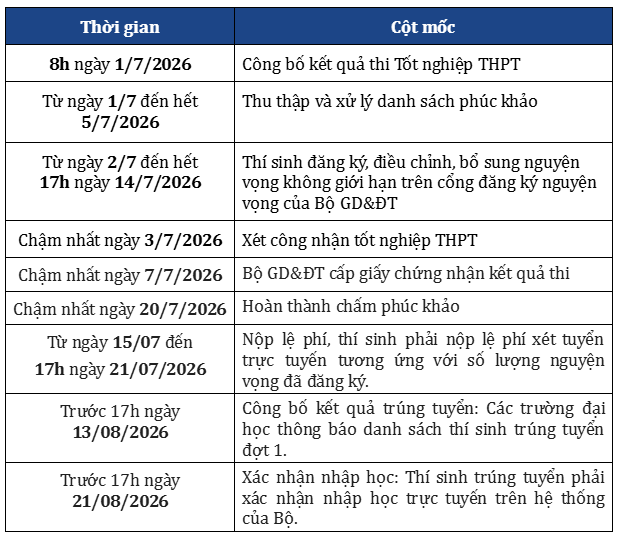
Important milestones candidates need to know
Note: Candidates who have already registered for a scholarship by the method of high-school transcript results or the VNU-HCM ĐGNL still have to register preferences on the Ministry of Education and Training’s admission system to have their official admission result recognised.
Detailed guide on how to register preferences
Step 1: Log in to the Ministry of Education and Training’s admission system
Candidates access the Ministry of Education and Training’s System at the address:https://thisinh.thitotnghiepthpt.edu.vn
Then log in by:
- Entering the citizen identity card number or personal identification code.
- Entering the issued password.
- Entering the confirmation code (Captcha).
- Selecting Log in.
For 12th-graders, the login account is issued by the high school in advance. Independent candidates register an account according to the guidance of the local Department of Education and Training.
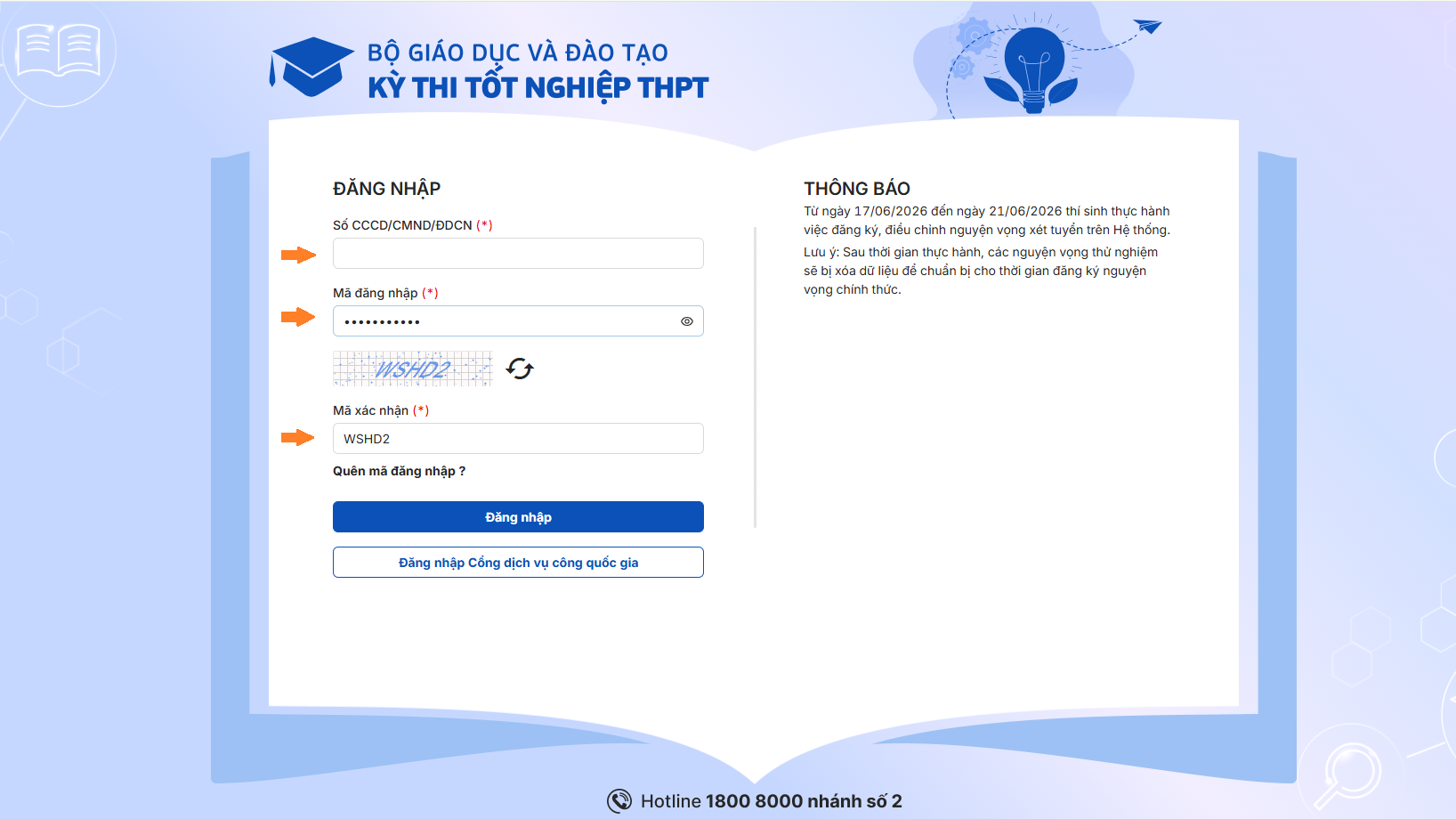
Step 1: Log in to the Ministry of Education and Training’s admission system
Step 2: Check personal information
After logging in successfully, candidates should carefully check the personal information being displayed on the system.
The information to review includes:
- Full name
- Date of birth
- Citizen identity card number
- Priority area
- Priority subject
- Academic information
- Converted certificates (if any)
Early checking helps candidates detect and promptly adjust errors that could affect their admission rights.
If inaccurate information is detected, candidates need to contact the responsible teacher or the application-receiving point for support in adjusting it.
Step 3: Register university admission preferences
At the main interface of the system, candidates select the Register admission information item.
- For candidates under direct admission: Candidates select direct-admission preferences according to the system’s guidance.
- For candidates admitted by other methods: Candidates select Add preference and enter full information:
-
- University code
- Field code
- Training-field name
- Admission method
- Admission combination (if any)
After completing, select “Add new” to save the preference.
Note: Each preference corresponds to a specific field of study at one university. Therefore, candidates need to carefully check the university code and field code before confirming.
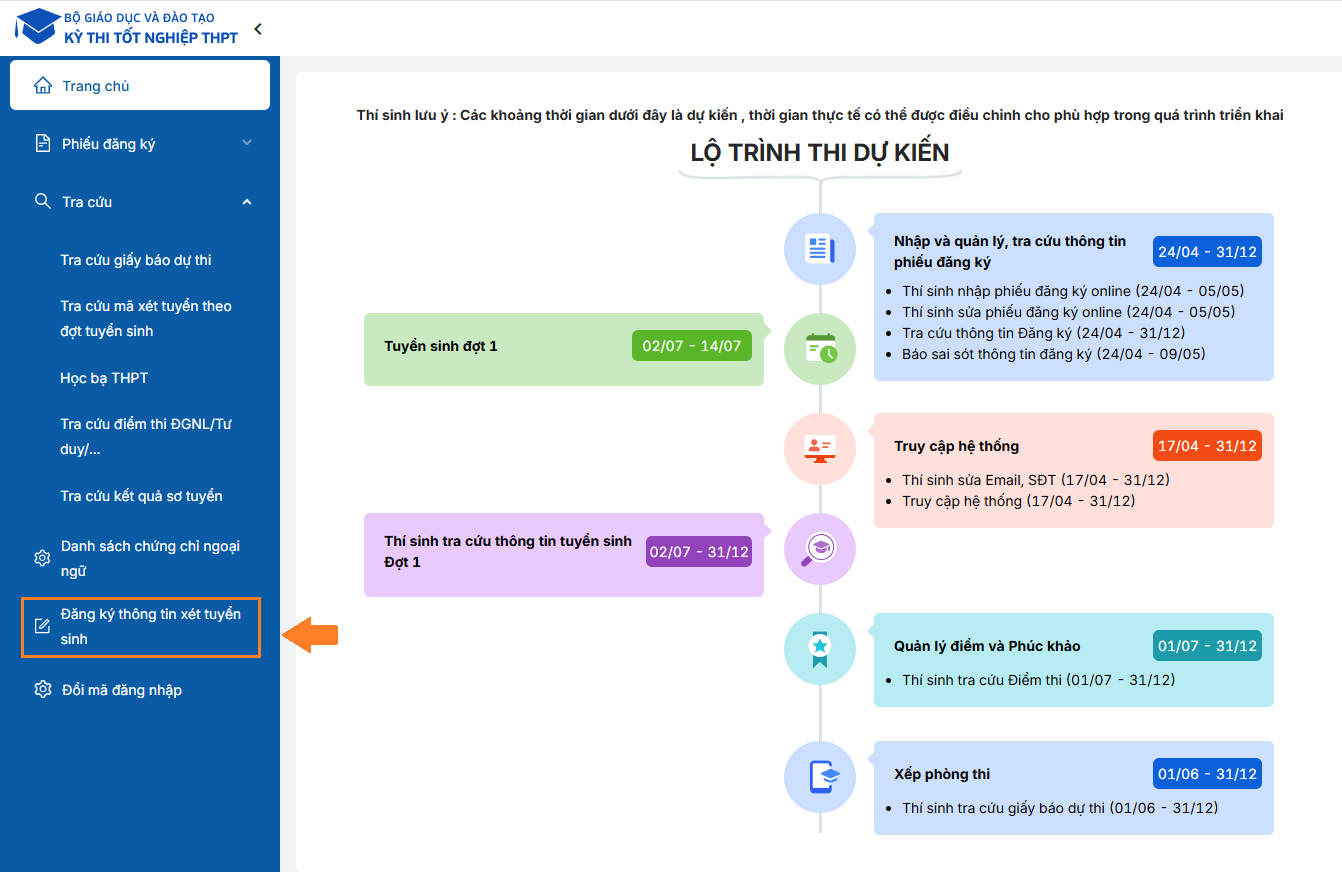
Step 3: Register university admission preferences
Register preferences for HUFLIT
If you wish to apply for admission to Ho Chi Minh City University of Foreign Languages – Information Technology (HUFLIT), candidates select University code: DNT.
A training field suited to career orientation and personal interests
HUFLIT currently trains many field groups in the areas of:
- Information Technology
- Language and Culture
- Business – Management – Services
- Communication – External Relations – Events
- Economics and Law
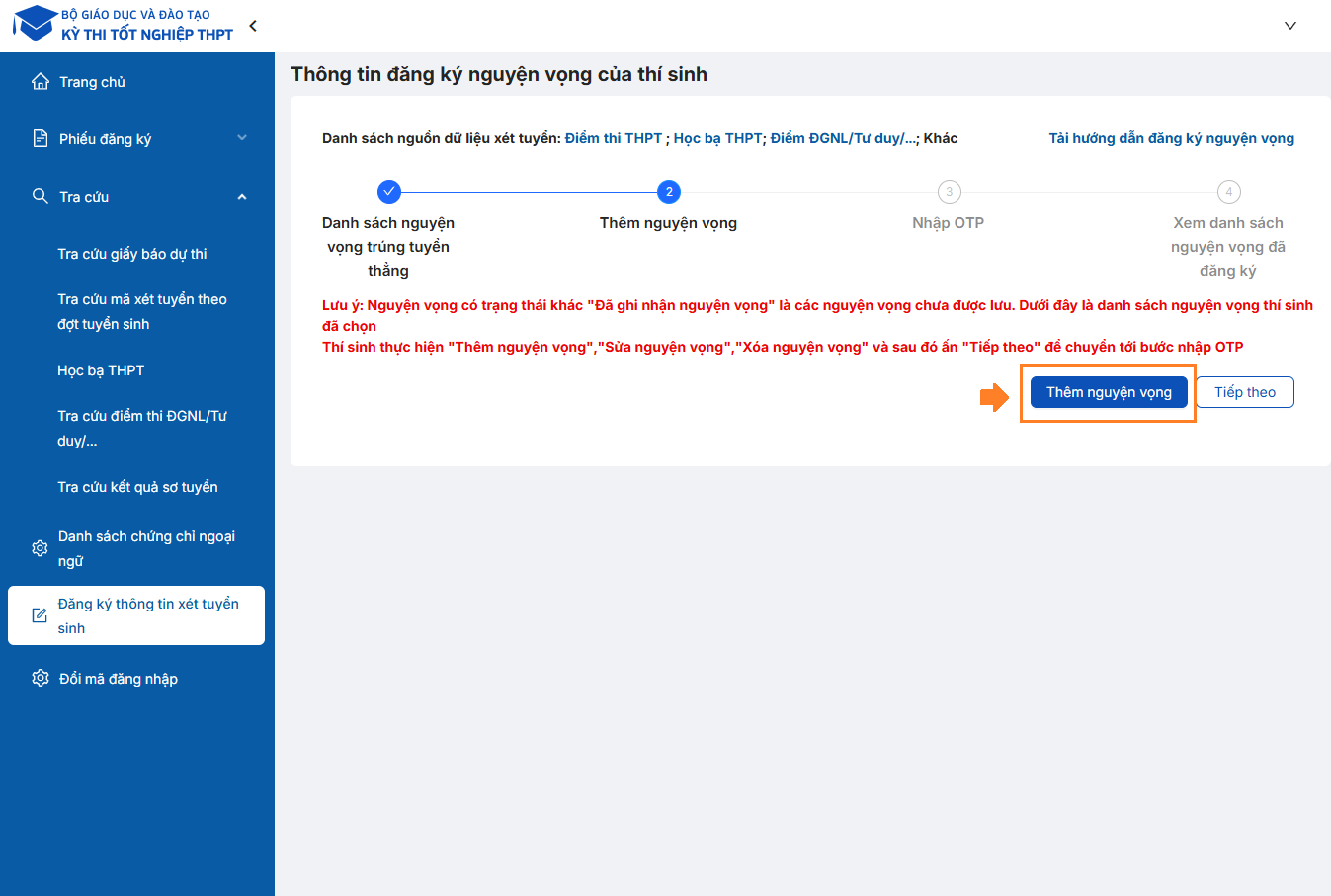
Candidates select the "Add preference" button to register for their favourite field and university
Note: Preferences with the status “Preference recorded” are preferences that have not yet been saved. The list below shows the candidate’s selected preferences. Candidates carry out “Add preference”, “Edit preference”, “Delete preference” and then press “Next”.
Next, select “Add preference” if registering anew or “Adjust preference order” if there were previous preferences.
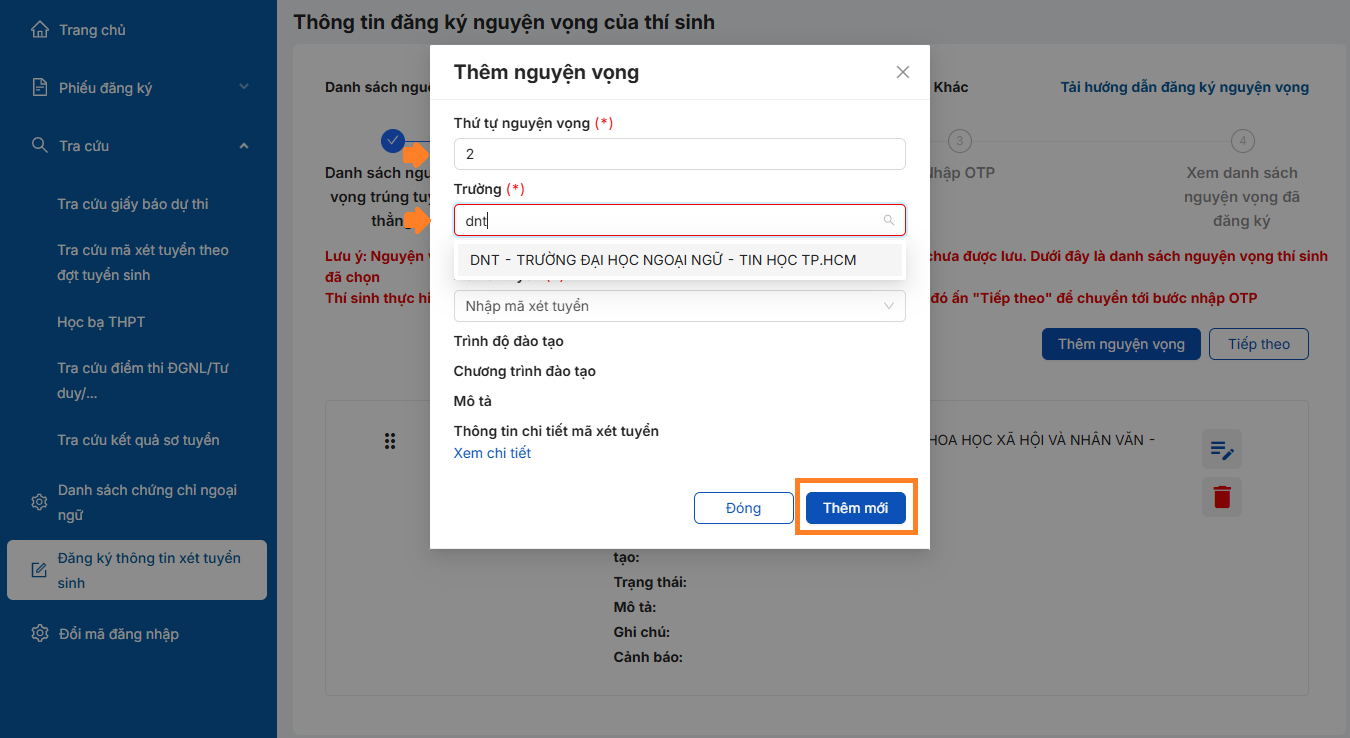
If you love HUFLIT, select university code DNT
Then fill in full information for each preference:
– Field code: Select exactly the desired field of study.
– University code: Select exactly the registered university.
– The corresponding admission method and subject combination.
The candidate’s preference-registration information is completed after pressing “Add new”.
Each preference corresponds to a specific field of study at one university. Therefore, candidates need to check the field code exactly before confirming to avoid registering the wrong one.
According to the 2026 admission regulations, candidates can register up to 15 admission preferences.
For pedagogy fields, candidates must arrange preferences from 1 to 5.
Note: Candidates who choose HUFLIT as NV1 (first preference) will receive a 50% first-semester tuition scholarship.
Step 4: Arrange the preference order
After completing registration, candidates need to arrange the preferences in priority order from high to low.
Preference No. 1 should be the field of study or university that the candidate most wishes to attend.
The Ministry of Education and Training’s common admission system will consider from the highest-priority preference down to the lower ones.
Example:
- If eligible for admission at Preference 1, the system will stop considering the preferences below.
- If not eligible at Preference 1, the system continues to consider Preference 2 and the following preferences.
Therefore, candidates should arrange preferences according to their real level of preference instead of only choosing fields considered “safe”.
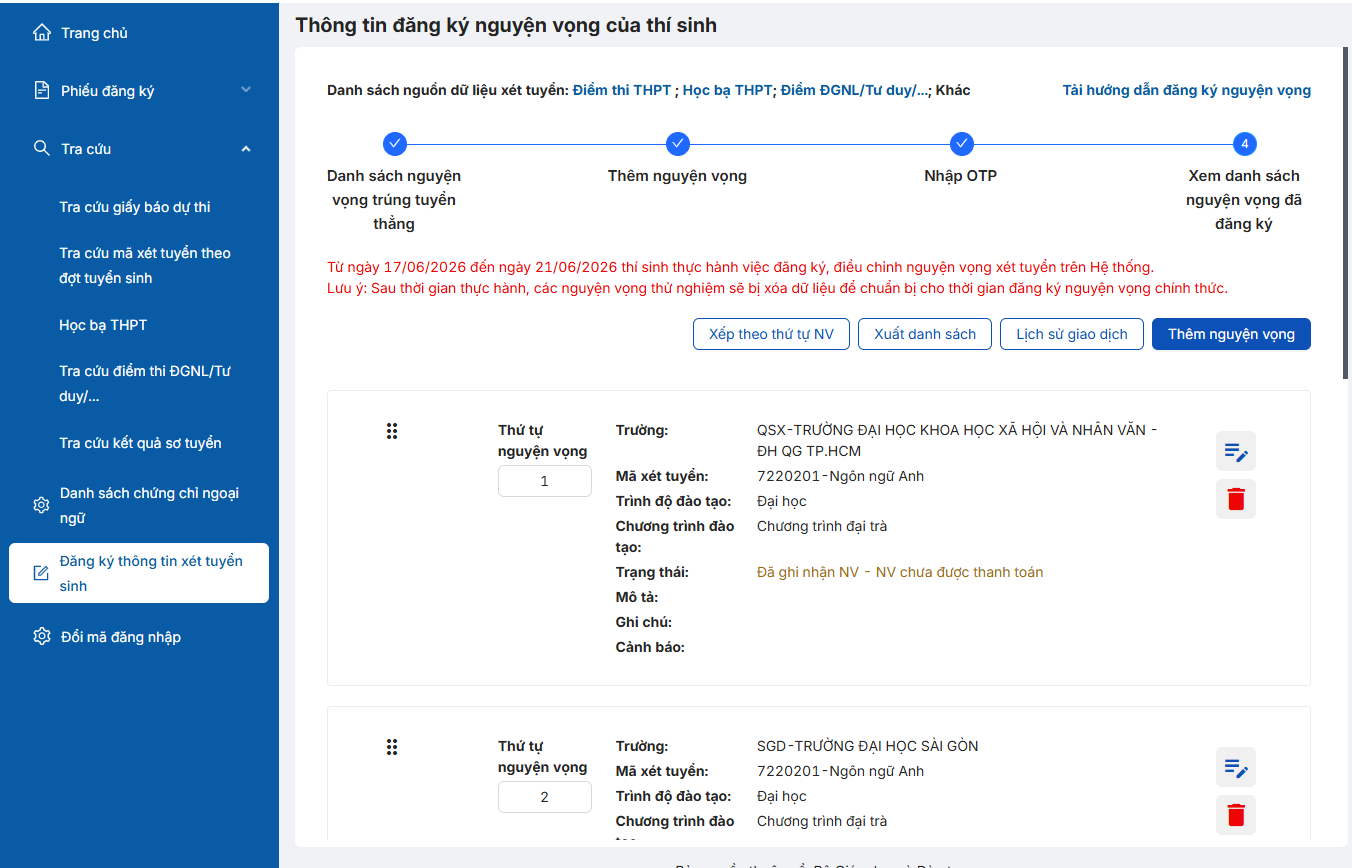
Arrange preferences in priority order; the high position is the most-favoured preference, and the further down, the lower the level of preference
Step 5: Save and confirm the preference registration
After checking all the information, candidates authenticate the registration with an OTP code.
Steps to carry out:
- Use the phone number registered on the system.
- Compose a message according to the prescribed syntax.
- Receive the OTP code sent to the phone.
- Enter the OTP code into the system.
- Select Confirm registration.
After successful confirmation, all preference-registration information will be recorded by the system.
Note: the OTP code is only valid for a certain time. Candidates should confirm immediately after receiving the code.
- Using the registered phone number, compose a message with the syntax: TSO <citizen identity card/ID number> send to 6058.
- The system will send back the OTP authentication code.
- Enter the OTP code into the confirmation box on the system. (marked with an arrow)
- Press “Confirm registration” to complete.
The OTP code is usually only valid for about 30 minutes. Therefore, candidates should enter the code immediately after receiving it. In case the prescribed time is exceeded, the operation must be redone to receive a new code.
After successful confirmation, all preference-registration information will be recorded by the system.
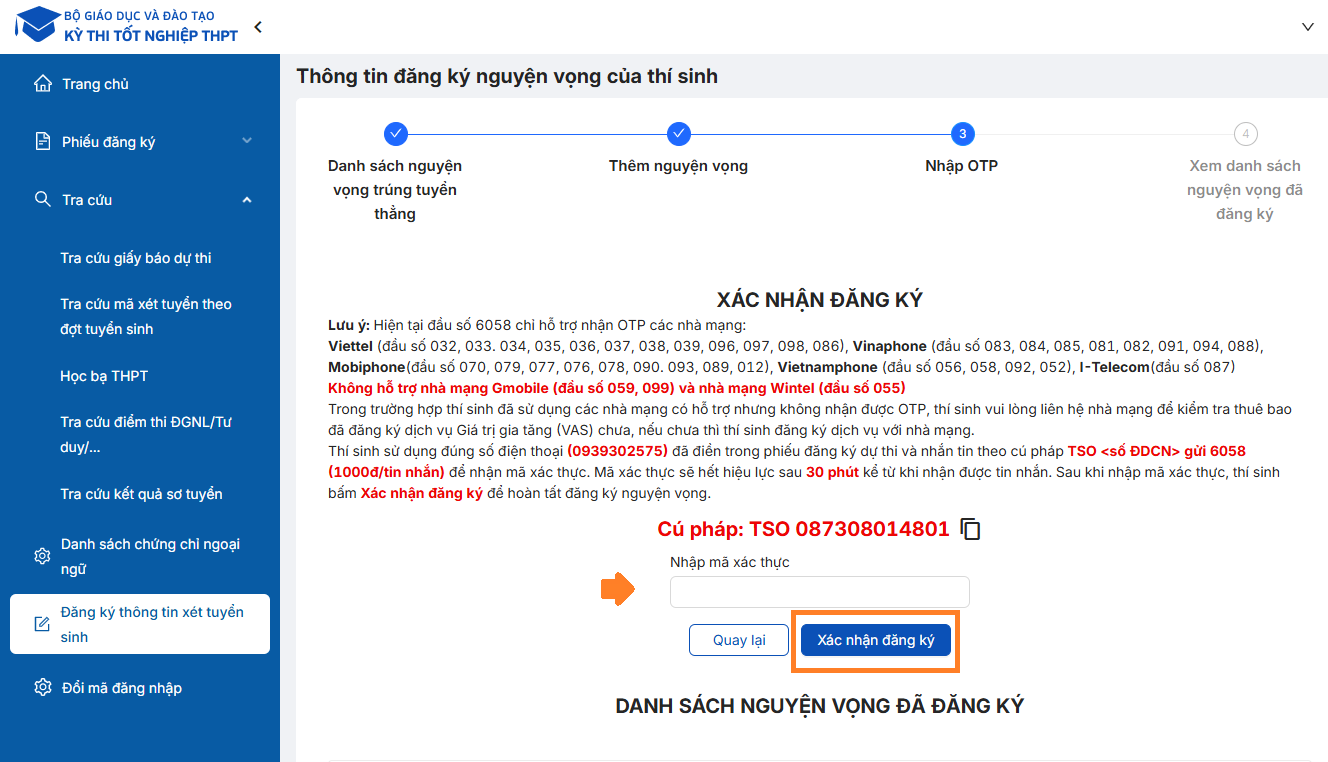
The OTP code is only valid for a certain time. Candidates should confirm immediately after receiving the code; candidates must complete the operation within the prescribed time
Step 6: Pay the admission fee online
After the end of the preference-registration period, candidates need to pay the admission fee according to the Ministry of Education and Training’s guidance.
The steps to carry out include:
- Select the Payment function on the system.
- Check the number of registered preferences.
- Confirm the payment information.
- Choose a suitable payment method.
- Complete the transaction.
After successful payment, candidates should:
- Save the payment receipt.
- Check the payment status on the system.
When the system displays the completion-confirmation status, the preference registration and admission-fee payment have been successfully recorded.
Important notes when registering university preferences in 2026
To avoid unnecessary errors, candidates need to note:
✔ Carefully check the university code and field code before confirming.
✔ Closely follow the Ministry of Education and Training’s timelines.
✔ Do not wait until the last days to register preferences.
✔ Complete the OTP confirmation according to the guidance.
✔ Pay the admission fee within the prescribed time.
✔ Arrange preferences according to your own real level of priority.
Why should you consider placing HUFLIT in a priority preference position?
Choosing a suitable field of study is an important factor, but choosing a learning environment also plays a decisive role in the journey of future career development.
With more than 30 years of formation and development, HUFLIT is a multidisciplinary, application-oriented training environment that focuses on foreign languages, technology and career skills. Students study in a dynamic, modern environment with many opportunities to connect with enterprises right from their time at school.
Alongside a training programme tied to reality, HUFLIT also brings many experiential, internship and skill-development activities that help students be ready to adapt to the domestic and international labour market.
If you have learned about and love the training fields at HUFLIT, candidates should arrange HUFLIT in a suitable preference position to increase the chances of being admitted to the desired field of study.
In particular, candidates who register HUFLIT as Preference 1 will receive a scholarship reducing 50% of first-semester tuition according to the University’s 2026 admission policy.
Need admission-consultancy support
If you need advice on choosing a field of study, admission method or support in registering preferences, candidates and parents can contact the HUFLIT Admissions Office for quick and accurate support.
Choose HUFLIT – proficient in foreign languages, solid in technology, good at expertise!
CONTACT INFO
Apply for admission at
tuyensinh.huflit.edu.vn
Find out information
huflit.edu.vn
Advising education enrollment